HomeBlogBusinesses in ChatGPT: How to Claim, Verify and Prepare Your Business
AI SEO
Businesses in ChatGPT: How to Claim, Verify and Prepare Your Business
Asim Ansari
November 11, 2026
27 min read
Learn how to claim your business in ChatGPT Business Hub, verify ownership, connect product feeds, and check Business Agent eligibility.
Quick Answer
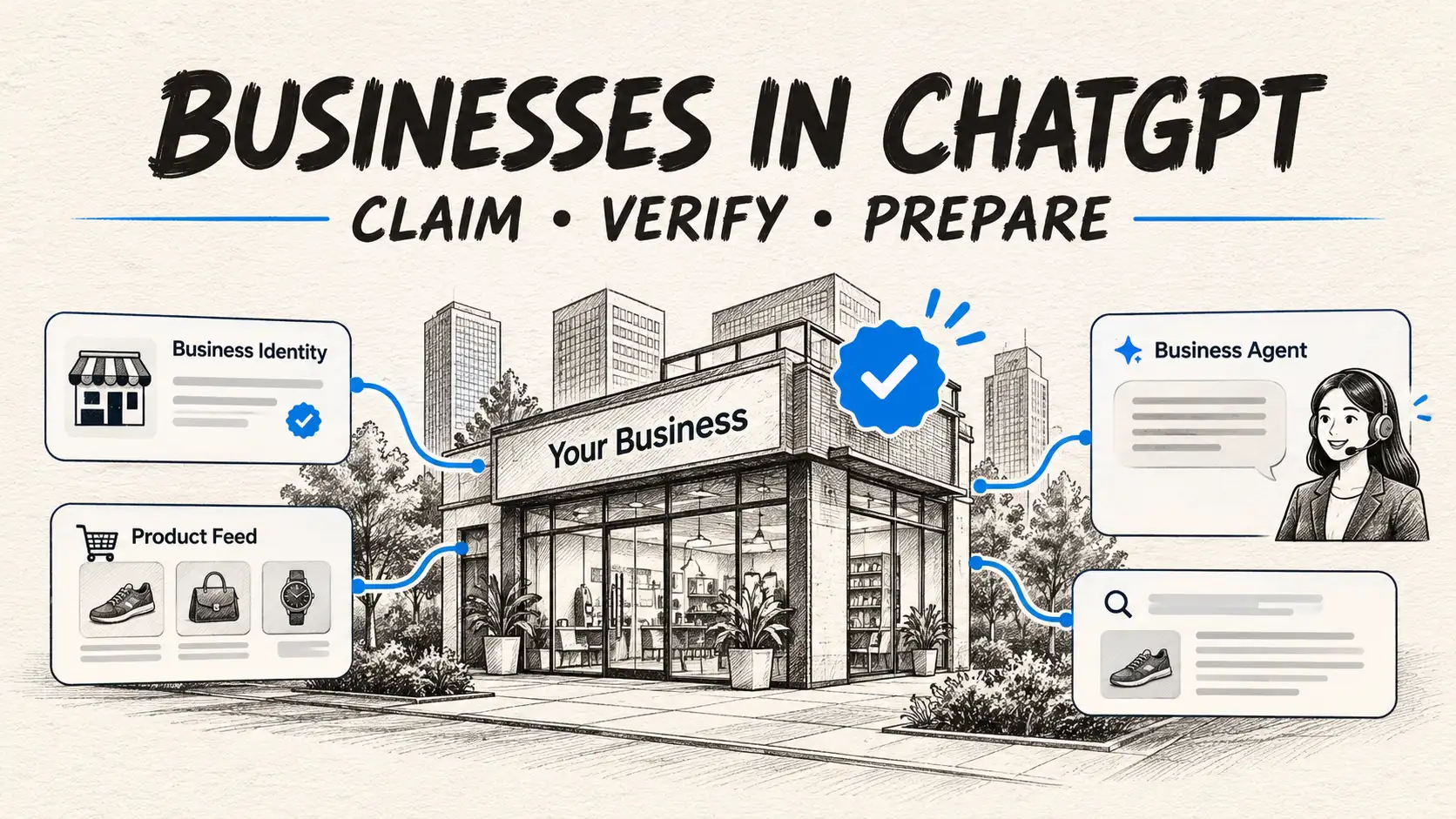
What is Businesses in ChatGPT? Announced in beta by OpenAI on November 10, 2026, Businesses in ChatGPT is a self-service management program inside Business Hub. It allows verified company representatives to claim their official profile, update company descriptions and operating hours, connect structured product catalogs (via Shopify or supported CSV/hosted product feeds), and inspect aggregate discovery analytics (such as brand mentions, website clicks, and high-level discovery topics). Eligible US e-commerce and online-service businesses can also configure an interactive Business Agent to answer product questions and link visitors to their website. Crucially, claiming a profile does not guarantee commercial ranking, priority placement, or automated recommendations in ChatGPT's search responses.
Businesses in ChatGPT was introduced as a beta program by OpenAI. Availability depends on business category, operating location, and supported verification pathways. Interactive Business Agents are currently available in beta to eligible e-commerce and online-service merchants in the United States.
The landscape of search and commercial discovery is experiencing a significant shift. For decades, companies focused primarily on Google Business Profiles, Google Search Console, and local SEO citations.
With hundreds of millions of consumers now prompting ChatGPT directly to discover tools, research services, and explore product options, OpenAI introduced Businesses in ChatGPT, a beta program within Business Hub.
Through this program, organizations gain a structured administrative portal to claim their profile, verify entity ownership, connect product catalogs, and review high-level discovery trends.
However, treating Business Hub as an automatic shortcut to dominating ChatGPT Search visibility is a critical mistake.
In this comprehensive guide, we explore how Businesses in ChatGPT works, what separates a Business Profile from a Business Agent, step-by-step verification blueprints, and how enterprise brands can optimize their data for the generative search era.
What Is Businesses in ChatGPT?
Businesses in ChatGPT is a suite of merchant and administrative management tools housed inside OpenAI's Business Hub.
It provides organizations with a standardized, verified mechanism to:
Claim official entity identity: Establish official ownership and maintain accurate business identity records.
Synchronize accurate operational data: Maintain authoritative customer service numbers, physical store locations, business hours, and returns policies.
Connect structured product feeds: Share product listings, descriptions, variants, and pricing (via Shopify or supported CSV/hosted feeds), linking users directly to product pages on your website.
Deploy branded Business Agents: If eligible, enable an interactive assistant to answer customer questions about products and policies, directing visitors to your site for checkouts or bookings.
Access aggregate discovery insights: View aggregated brand mention counts, website referral clicks, and high-level discovery topics where your business is cited.
Business Hub, Business Profile, Product Feed, and Business Agent: What Is the Difference?
A common source of confusion is the distinction between the various features bundled within Business Hub. They represent distinct technical capabilities with different access levels:
1. Business Hub
Administrative Command Center
Core Functionality
The central web-based admin console where authorized company representatives claim, configure, and manage official business records and team permissions.
Critical Distinction & Governance
Accessible directly from the ChatGPT navigation sidebar. Administrative controls unlock after completing Persona identity verification; required documents and verification steps vary based on account and business entity type.
2. Business Profile
Public Identity Card
Core Functionality
The public-facing business identity card displaying official company descriptions, canonical URLs, physical addresses, operating hours, and customer contact channels.
Critical Distinction & Governance
Claiming a profile gives you data accuracy; it does not guarantee automated algorithmic recommendations or top organic ranking in ChatGPT search responses.
3. Product Feed
Structured Catalog Integration
Core Functionality
Structured catalog ingestion (via Shopify connection or supported CSV / hosted feeds) allowing businesses to provide product titles, descriptions, prices, variants, availability, and direct links to their website.
Critical Distinction & Governance
Product feed updates can take time to process, review, and publish across ChatGPT. Maintaining accurate, current catalog pricing and availability is required under OpenAI policies.
4. Business Agent
Conversational Sales & Support
Core Functionality
An optional, interactive AI assistant customized with brand-provided knowledge, product manuals, and service guidelines to answer buyer follow-up questions and direct visitors to your website for purchases or bookings.
Critical Distinction & Governance
Operates in a clearly labelled, distinct visual container. A Business Agent links users to your website rather than directly processing payment checkouts, bookings, or private order lookups within the chat.
5. Business Insights
Discovery & Mention Insights
Core Functionality
Aggregated analytics dashboard reporting brand mention frequencies, external website referral click-throughs, and high-level discovery topics where your business is surfaced.
Critical Distinction & Governance
Privacy-preserving by design. Discovery topics reflect aggregated thematic groupings rather than raw user prompts or direct intent tracking, and data requires minimum volume thresholds to display.
For e-commerce merchants, OpenAI provides native integration for Shopify store owners, allowing catalogs to synchronize directly through the Shopify App Store or Business Hub interface. However, a Shopify store is simply one supported integration path, not an absolute requirement for general business claiming.
Who Can Claim a Business on ChatGPT?
OpenAI enforces eligibility and verification criteria to protect brand integrity and prevent unauthorized listing claims.
Business Profile Eligibility
Authorized Representative: Must be an authorized representative designated to manage the business's official presence.
Business Type & Location: Eligibility depends on your business type, country, and available verification methods. For local stores and restaurants, OpenAI notes that claiming is currently available for businesses with existing US directory listings.
Supported Verification: Available verification channels (such as DNS records, company email, business phone, or Shopify connection) vary based on the listing.
Persona Identity Verification: The representative must complete Persona identity verification; required documents and verification steps vary depending on account and region.
Business Agent Eligibility (Beta)
Current Beta Availability: In the current beta, Business Agents are available to eligible e-commerce and online-service businesses in the United States.
Catalog & Support Readiness: Requires connected product feeds or accurate business documentation, transparent pricing, and clear customer support or return pathways.
Policy Compliance: Must comply with OpenAI's Business Agents Policy and commercial usage guidelines.
Separate Publishing Step: Claiming a Business Profile does not automatically deploy a Business Agent; publishing an agent is a separate, managed step.
How to Claim and Verify Your Business on ChatGPT (Step-by-Step)
To claim your business listing, follow this eight-step verified setup roadmap based on the official OpenAI Setup Guide:
01
Sign In with Your Official Business Account
Log into ChatGPT using the account credentials designated for managing your organization. Using an authorized corporate account or your official business login ensures ownership remains cleanly associated with your team.
02
Locate Business Hub in the ChatGPT Sidebar
Navigate to the Business Hub navigation tab. Use the search bar to locate your company name. If your company has already been indexed by ChatGPT's web crawlers, a draft profile listing will appear.
03
Select and Inspect the Correct Listing
Verify that the selected entity matches your official company name, website URL, and headquarters location to prevent claiming duplicate or unrelated listings.
04
Select a Supported Verification Method
Depending on your business profile, OpenAI offers several verification methods:
• DNS TXT Record: Adding a verification token to your root domain's DNS records.
• Corporate Email Match: Confirming a code sent to an email address matching your verified website domain.
• Shopify OAuth Authentication: Connecting an active, verified Shopify store account.
• Business Phone Verification: Receiving an SMS or voice verification code on official company phone records.
05
Complete Persona Identity Verification
To verify administrative authority and safeguard against unauthorized claiming, OpenAI routes the representative through Persona identity verification. Complete the guided verification flow; required documents and checks vary depending on the account and region.
06
Audit and Standardize Core Business Information
Once verified, review every populated field. Ensure your business categories, company descriptions, physical locations, customer service contact numbers, and operational hours match your live website.
07
Connect Supported Product Feeds
Connect your catalog via supported methods (such as direct Shopify integration or hosted CSV feeds). Product feed updates undergo processing and review before appearing live in ChatGPT.
08
Configure and Deploy Your Business Agent (If Eligible)
If eligible, define your agent's instructions, brand voice, and knowledge boundaries. The agent can answer shopper questions and direct users to your site to purchase or book.
⚠️DNS TXT Record Tip for Technical Teams
When verifying via DNS, ensure the TXT record is placed on the root apex domain (e.g., intellectualclouds.com) rather than a temporary staging subdomain. Allow 15 to 45 minutes for global DNS propagation across authoritative nameservers before clicking "Verify" in Business Hub.
What Is a ChatGPT Business Agent?
A Business Agent is an interactive, brand-governed AI assistant that lives directly inside ChatGPT. When a user asks questions about your products or services, they can opt to chat with your Business Agent to receive official answers tailored to your catalog.
How Customers Encounter and Interact with a Business Agent
1
User Query in ChatGPT Interface
"Best enterprise CRM consultancy for custom AI integration"
↓
2
Independent ChatGPT Search Synthesis
ChatGPT returns neutral, algorithmic citations based on web consensus and authority.
↓
3
Verified Merchant Card Displayed
"Chat with Verified Intellectual Clouds Business Agent"
Verified ✓
↓
Branded Business Agent Environment
Official Merchant AI
✓Mandatory Disclosure: Explicit banner stating: "AI assistant speaking on behalf of the merchant."
✓Official Knowledge Scope: Answers guided by brand-provided documentation and catalog data, linking users directly to the website for purchases or service bookings.
✓Dedicated Container: Clean visual demarcation ensuring users never confuse branded promotional responses with neutral web search.
✓Human Escalation Gate: Direct, one-click links to human customer service, live booking forms, or phone hotlines.
Documented Capabilities and Current Boundaries
When deploying an interactive Business Agent, it is essential to understand both what it can do and its current operational limits:
What It Can Do: Answer customer inquiries about products, specifications, return policies, and service details using brand-provided knowledge assets, while providing direct links to product pages on your site.
Current Operational Boundaries: A Business Agent does not directly process checkout payments, collect billing details, book calendar slots internally, or perform private customer order status lookups inside ChatGPT; it routes users to your website to complete those actions.
Essential Rules for Deploying a Business Agent
Mandatory Identity Disclosure: The agent must explicitly state that it is an artificial intelligence assistant speaking on behalf of the business. It cannot masquerade as an independent third-party reviewer.
Substantiated Claims Only: You cannot instruct your agent to hallucinate fake discounts, fabricate awards, or misrepresent inventory availability.
Escalation Paths: The agent must provide clean fallback pathways to official human customer support, email ticketing, or telephone helpdesks when an inquiry exceeds its knowledge perimeter.
Does Claiming a Business Improve ChatGPT Rankings?
This is the single most critical strategic question for founders and marketing directors.
The Ranking Reality Check
No ranking, recommendation, or placement advantage is guaranteed. Claiming and verifying your profile in Business Hub gives you control over the data you contribute; it does not force ChatGPT to cite your company, prioritize your brand over competitors, or display your products first in organic search answers. OpenAI's terms explicitly disclaim any ranking guarantees or traffic commitments.
Industry Perspective & SEO Analysis: While OpenAI has not published internal algorithmic ranking weights for ChatGPT Search, modern Information Retrieval (IR) and Answer Engine Optimization (AEO) research indicates that conversational AI models formulate citations based on cross-web entity consensus, independent third-party coverage, and topical semantic relevance across independent sources rather than listing claims alone.
Think of Business Hub as analogous to Google Business Profile or Google Merchant Center: claiming your listing ensures your telephone number and address are accurate when users ask about you, but it does not automatically place your website at position #1 on Google's search engine results page.
Preparing Your Platform for AI-Driven Search and Commerce?
From structured schema optimization and llms.txt generation to headless AI commerce integrations, Intellectual Clouds builds durable, search-ready architectures for modern enterprises.
Claiming your profile in Business Hub is only one component of a modern Generative Engine Optimization (GEO) strategy. Follow this six-point technical blueprint:
1. Establish Strict Entity Consistency Across the Web
Ensure your exact legal brand name, corporate address, phone number, and founding history match across your website, LinkedIn, Wikidata, Crunchbase, and Business Hub. Discrepancies create entity resolution ambiguity for LLM crawlers.
2. Implement Semantic HTML & Schema.org JSON-LD
Deploy explicit Organization, Product, FAQPage, and Service schema markups. For implementation guidelines, see our comprehensive manual on how to format content for AI crawlers.
Some technical teams experiment with hosting an llms.txt file at their web root as an optional emerging convention to provide concise markdown summaries for autonomous bots. While not an official ranking factor for ChatGPT, it helps provide clean, structured context for web crawlers.
4. Maintain Updated Product Feeds
If connecting an e-commerce catalog (via Shopify integration or hosted CSV feeds), schedule regular updates to ensure stock status, pricing, and variants remain synchronized. Inaccurate prices or obsolete product listings violate OpenAI commercial policies.
5. Monitor Aggregate Business Hub Insights
Track your Business Hub analytics dashboard regularly. Review trends in total brand mentions, monitor outbound website referral clicks, and review discovery topics to understand high-level themes where your business is cited without violating user privacy.
6. Audit ChatGPT Mentions Systematically
Regularly run structured benchmarking queries across ChatGPT, Perplexity, and Claude for your target service keywords. Document citation frequency, evaluate answer accuracy, and refine on-page knowledge assets accordingly. Learn more in our guide on What Is Answer Engine Optimization (AEO).
Privacy and Customer Trust
A vital aspect of OpenAI's Business Hub architecture is data isolation:
Zero Prompt Peeking: Business owners cannot read individual customer conversations, private user queries, or full Business Agent chat transcripts.
Aggregation Thresholds: Analytics metrics (such as topic mentions or website clicks) are only displayed once statistically meaningful interaction thresholds are reached, preventing micro-targeting or identity de-anonymization.
Account Security: Requiring Persona identity verification ensures that unauthorized actors cannot easily claim or tamper with commercial listings.
Frequently Asked Questions
1. How do I claim my business on ChatGPT?
Sign in to ChatGPT with your corporate account, open the Business Hub tab in the navigation sidebar, search for your company name, and select the corresponding listing. You will be prompted to verify ownership via DNS TXT record, corporate email verification, business phone OTP, or Shopify connection, followed by Persona identity verification.
2. Do I need a Shopify store to claim a business profile?
No. Shopify is simply one supported partner integration route that streamlines e-commerce catalog ingestion. Any eligible business in software, professional services, local commerce, or non-Shopify retail can claim their profile directly using DNS domain verification or corporate email authentication.
3. Can any verified business deploy a Business Agent?
No. Profile claiming and Business Agent deployment have separate eligibility tiers. As of November 2026, interactive Business Agents are in a restricted beta available primarily to eligible e-commerce and online-service businesses located within the United States. Expansion to additional sectors and countries is planned.
4. Does claiming a business guarantee ranking in ChatGPT answers?
No. Claiming a business profile gives you administrative control over your official data and catalog, but it does not guarantee algorithmic placement, citations, recommendations, or customer traffic. ChatGPT generates independent answers based on semantic relevance, source authority, and web consensus.
5. Can businesses see what individual users ask in ChatGPT?
No. OpenAI does not share private user prompts, conversation histories, or identifiable customer logs with business owners. Business Hub only displays aggregate analytics (such as top discovery themes and total website referral clicks) once minimum interaction thresholds are met.
6. Does Businesses in ChatGPT replace traditional SEO?
No. It serves as an additional commercial touchpoint and direct data feed. Durable online discovery still requires comprehensive technical SEO, deep informational content, strong backlink authority, and Answer Engine Optimization (AEO) across Google, Perplexity, Claude, and ChatGPT.
Author: Asim Ansari & Intellectual Clouds Editorial Team | Technical Review: AI Search & Enterprise Systems Architecture Lead | Published: November 11, 2026
Accuracy Notice: Aligned with official OpenAI developer releases and Business Hub documentation as of November 2026. Commercial feature availability, regional verification rules, and agent eligibility remain subject to ongoing OpenAI beta updates.
Asim Ansari is the Founder of Intellectual Clouds and a Certified Salesforce Administrator and Pardot Specialist with 17+ years of experience across Salesforce CRM, AI automation, cloud infrastructure (AWS), and digital transformation. He writes on AI agents, Salesforce delivery, Answer Engine Optimisation (AEO), and AI-accelerated business operations.