HomeBlogSalesforce AI: How to Choose Between CLI, MCP and Custom Actions for Agents
Salesforce
Salesforce AI: How to Choose Between CLI, MCP and Custom Actions for Agents
Asim Ansari
July 7, 2026
19 min read
Learn how to choose the right Salesforce AI action surface: CLI, Salesforce DX MCP, Hosted MCP Servers or Agentforce custom actions for safer agent workflows.
Quick Answer
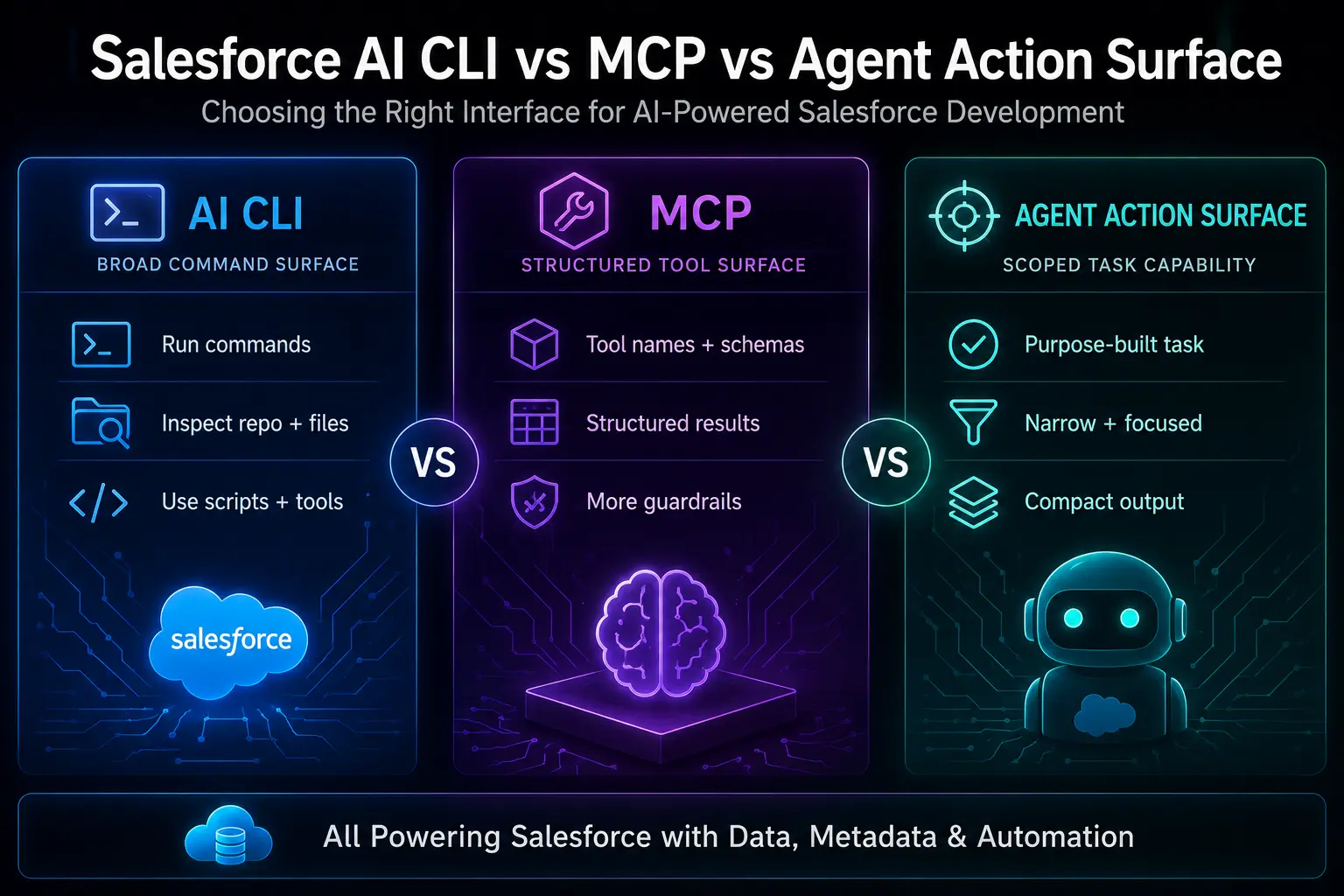
For Salesforce AI agents, use CLI when a trusted developer needs exploratory power in a controlled development environment. Use Salesforce DX MCP when the workflow is developer-oriented but needs structured Salesforce-native tools. Use Hosted MCP Servers when external AI clients need governed access to Salesforce capabilities. Use Agentforce/custom actions when the agent should perform one narrow, approved task with compact output and strong guardrails.
In the rapidly evolving world of Salesforce AI, developers and architects are grappling with a fundamental question: How should an AI agent interact with a Salesforce org?
Often, this debate is framed as Salesforce AI CLI vs MCP. However, this is fundamentally the wrong question.
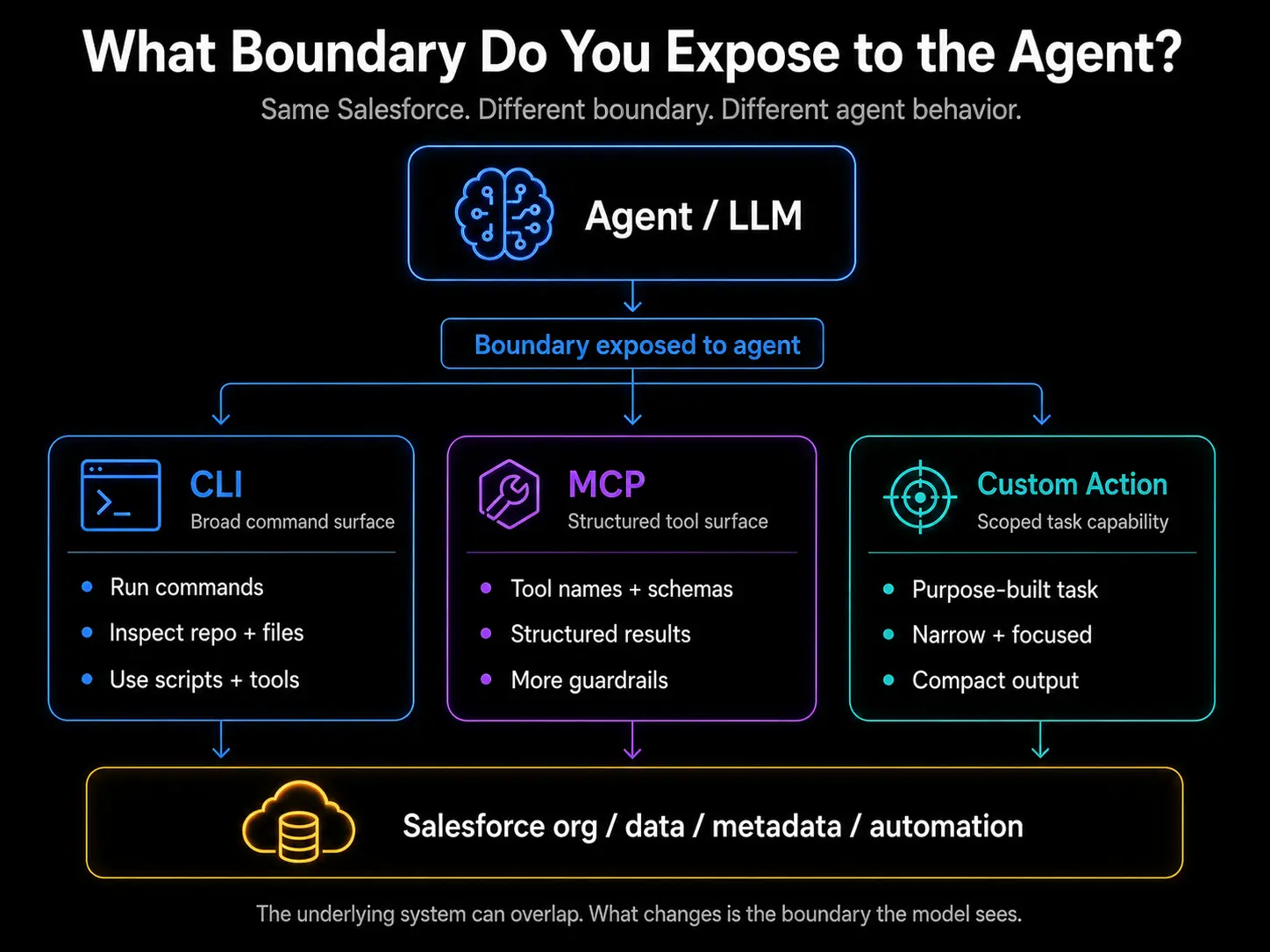
The core idea is this: The safest Salesforce AI architecture is not the one with the most tools. It is the one with the smallest useful action surface. The real question is not what technology to use, but rather, what boundary or action surface should we expose to the AI agent?
In this comprehensive guide, we will explore the different action surfaces available—Salesforce CLI, Salesforce DX MCP, Hosted MCP Servers, and Agentforce custom actions—and explain how to choose the right one to balance power, context, security, and usability.
1. What Is a Salesforce AI Action Surface?
An "action surface" is the boundary through which an AI agent interacts with the external world. In the context of Salesforce, it defines what an agent can see, what it can do, and how much context it requires to operate.
While the underlying Salesforce org, data, metadata, and automation might be the exact same, exposing those capabilities to an agent via CLI, MCP, or a Custom Action fundamentally changes the agent's behavior, efficiency, and risk profile.
2. Why “CLI vs MCP” Is the Wrong Question
The debate often centers around whether to give an agent access to the Salesforce CLI or to connect it via the Model Context Protocol (MCP), an open standard for connecting AI apps to external systems.
But asking "CLI or MCP?" focuses on the protocol rather than the architecture. An agent with unfettered CLI access can execute almost any command, while an agent connected to a poorly designed MCP server might drown in excessive tool descriptions.
3. The Real Question: What Boundary Should the Agent See?
Instead of focusing on the protocol, we must ask: What boundary should the agent see?
Every tool you give an agent increases its cognitive load (context window) and its potential blast radius. The goal of a secure and efficient Salesforce AI architecture is to expose the smallest useful boundary required to complete a specific task.
Let's break down the four primary boundaries you can expose to an agent.
4. Salesforce CLI as a Broad Developer Surface
The Salesforce CLI is an incredibly powerful tool. It can build Agentforce agents, manage Salesforce DX projects, scratch orgs, sandboxes, source sync, packages, and more.
When you give an AI agent (like Claude) access to a terminal running the Salesforce CLI, you are giving it a broad, exploratory surface. It can run commands, pipe outputs into grep, read files locally, and dynamically figure out what to do next.
The Catch: It requires a trusted environment. The agent can theoretically delete metadata, deploy breaking changes, or pull sensitive data if not carefully monitored. It is designed for developers who are actively pair-programming with the AI.
5. Salesforce DX MCP as a Structured Developer Surface
The Salesforce DX MCP Server wraps Salesforce developer capabilities into structured tools that an AI agent can understand via the Model Context Protocol.
Instead of typing raw CLI commands, the agent uses specifically defined tools (e.g., sfdx_run_tests, sfdx_deploy_source). This provides a structured developer surface. It is safer than raw CLI access because the agent is constrained to the tools provided by the MCP server, but it is still highly capable.
6. Hosted MCP Servers as a Governed Enterprise Surface
As enterprises scale AI, they often move away from local development environments to Hosted MCP Servers. These are centralized servers that expose specific Salesforce capabilities to various AI clients across the organization.
This represents a governed enterprise surface. IT can monitor, audit, and restrict which tools are available to which users or agents. It allows an enterprise copilot or an external AI client to safely interact with Salesforce data without needing local CLI installations.
7. Agentforce Custom Actions as Scoped Task Capabilities
Agentforce is Salesforce's native platform for building autonomous agents. Within Agentforce, you can define Custom Actions—which can invoke Flow, Apex, or external APIs.
Exposing an Agentforce custom action to an agent represents a scoped task capability. This is the tightest boundary possible. The agent isn't given generic tools to query the database; it is given a single action like Issue_Refund(orderId) or Escalate_Case(caseId).
This surface is incredibly safe, highly predictable, and perfect for business users.
8. Context Overhead: Why Too Many Tools Can Hurt Agents
One of the hidden dangers of the MCP approach is context overhead.
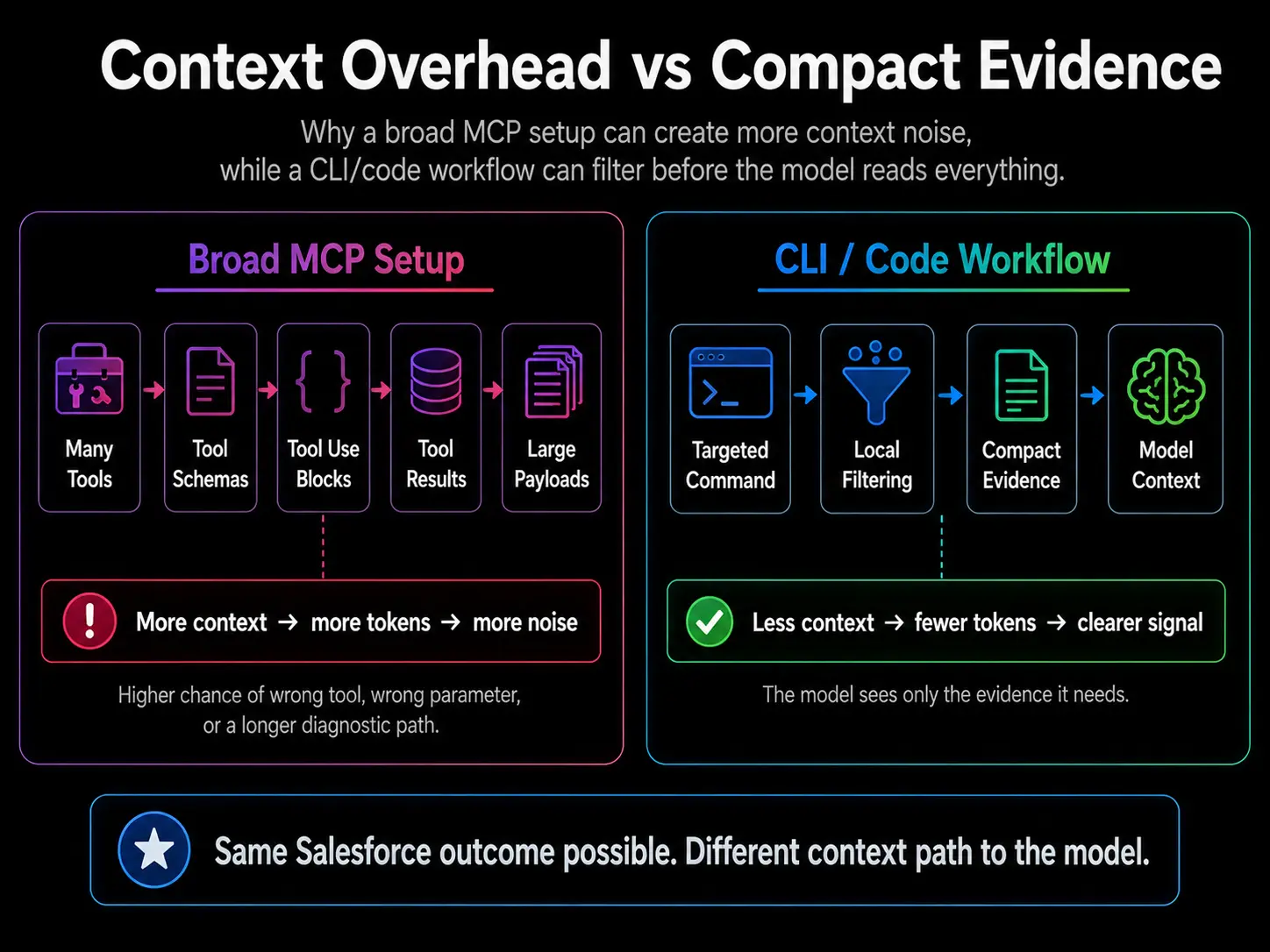
Anthropic's tool-use documentation confirms that tool definitions add input tokens through tool names, descriptions, schemas, tool_use, and tool_result blocks. A recent MCP architecture paper supports the idea that exposing too many tools can hurt an agent's tool-selection accuracy and increase operational complexity.
A broad MCP setup with dozens of tools, schemas, and large payloads can create "context noise." The agent spends too much of its context window just understanding what it can do, leaving less room for reasoning about what it should do.
Conversely, a CLI/code workflow often allows for a targeted command combined with local filtering (like using grep or jq), resulting in a much more compact evidence model.
9. CLI vs MCP vs Custom Actions: Comparison Table
To help you choose the right action surface, consider this breakdown:
Surface
Best For
Risk Profile
Best User
CLI
Debugging, repo inspection, metadata exploration
Broad blast radius
Trusted developer
Salesforce DX MCP
Structured dev workflows, org/project context
Tool/context overhead
Salesforce dev team
Hosted MCP
Governed access from external AI clients
Needs admin scoping
Enterprise users
Custom Action (Agentforce)
Narrow task execution
Less flexible, highly safe
Business users, support teams
10. Inner Loop vs Outer Loop Workflows
When architecting custom AI agents for Salesforce, it helps to divide workflows into "Inner Loop" (development, debugging) and "Outer Loop" (production execution, business tasks).
Read-only first: Always default to granting read-only access to agents unless a write action is explicitly required.
Evidence first: Require the agent to present evidence (queries, logs, records) before proposing a change.
Approval before write: For critical operations, implement a human-in-the-loop approval step before the agent executes a write command.
Warning
CLI is powerful but broad, making it risky in production environments. MCP is structured but can be noisy, potentially confusing the agent if too many tools are provided. Custom actions are safer but narrower, requiring more upfront configuration.
12. When to Use CLI
Use the Salesforce CLI when you have a trusted developer performing exploratory work in a sandbox or scratch org. The CLI is unbeatable for deep repository inspection, running dynamic SOQL queries to figure out data models on the fly, and troubleshooting complex Apex errors. It provides the highest degree of freedom but requires the highest degree of trust.
13. When to Use Salesforce DX MCP
Use the Salesforce DX MCP when your development team wants to integrate AI into their IDEs (like Claude for Desktop or Cursor) using structured, predictable commands. This surface is excellent for automating repetitive development tasks while keeping the agent somewhat constrained compared to a raw bash terminal.
14. When to Use Hosted MCP
Use Hosted MCP Servers when you need to connect external AI clients (like a custom enterprise copilot or an AI agent platform) to Salesforce in a governed manner. This is ideal for scenarios where you need to audit every tool call, enforce role-based access controls, and provide a curated set of capabilities to a broad audience across the enterprise.
15. When to Use Agentforce Custom Actions
Use Agentforce Custom Actions when you are building solutions for business users or support teams. If you want an agent to strictly follow a defined business process—such as resolving a billing dispute or updating an opportunity stage—without any risk of it running arbitrary queries, Custom Actions are the safest, most reliable choice.
16. Practical Decision Framework
If you are an architect trying to decide:
Are you a developer debugging code locally? Use CLI.
Are you standardizing AI tools for a dev team? Use Salesforce DX MCP.
Are you building an enterprise copilot for knowledge workers? Use Hosted MCP.
Are you automating a specific business process in Salesforce? Use Agentforce Custom Actions.
17. FAQs
What is a Salesforce AI action surface?
An action surface is the boundary or interface through which an AI agent interacts with Salesforce. It defines what capabilities the agent has access to, ranging from broad CLI access to narrow, specific custom actions.
Is MCP better than CLI for Salesforce AI agents?
Not necessarily. MCP provides structure and is better for governed, production environments. CLI provides raw power and flexibility, making it better for local developer exploration. The "best" choice depends on the user and the environment.
When should I use Salesforce CLI with Claude?
Use Salesforce CLI with Claude when you are a trusted developer working in a safe environment (like a scratch org) and you need the agent to perform complex, multi-step debugging, repo analysis, or metadata comparisons.
What is Salesforce DX MCP Server?
It is a Model Context Protocol server that exposes Salesforce developer tools (like running tests, executing SOQL, or deploying source) as structured capabilities that AI agents can easily understand and invoke.
What are Salesforce Hosted MCP Servers?
Hosted MCP servers run in a centralized environment rather than on a developer's local machine. They allow IT to govern and monitor which external AI clients and users can access specific Salesforce tools and data.
What are Agentforce custom actions?
They are narrow, specific tasks defined within Salesforce's Agentforce platform (often backed by Flows or Apex) that an agent can execute. They represent the safest and most controlled way for an agent to interact with Salesforce.
Why can broad MCP setups create context overhead?
Every tool provided to an agent requires a description, schema, and payload. Exposing dozens of tools consumes a significant portion of the agent's context window, leading to "context noise" and reducing the agent's ability to reason effectively.
Which surface is safest for business users?
Agentforce custom actions are the safest. They limit the agent to performing only explicitly defined business tasks, minimizing the risk of unintended data modification or unauthorized access.
How do I govern Salesforce AI agents?
Govern agents by exposing the smallest useful action surface. Implement "read-only first" policies, require agents to present evidence before acting, and mandate human-in-the-loop approvals for critical write operations.
Can Intellectual Clouds design Salesforce AI agent architecture?
Yes, Intellectual Clouds specializes in Salesforce consulting and AI architecture. We help organizations design secure, efficient agent workflows using the right mix of Agentforce, MCP, and custom integrations.
18. How Intellectual Clouds Can Help
Designing the right AI architecture requires deep expertise in both artificial intelligence models and enterprise software ecosystems.
Need a Safe Salesforce AI Agent Architecture?
Intellectual Clouds helps Salesforce teams design AI agents, Agentforce actions, MCP integrations, CLI workflows and governed automation surfaces that balance power, context, security and business usability.
Asim Ansari is the Founder of Intellectual Clouds and a Certified Salesforce Administrator and Pardot Specialist with 17+ years of experience across Salesforce CRM, AI automation, cloud infrastructure (AWS), and digital transformation. He writes on AI agents, Salesforce delivery, Answer Engine Optimisation (AEO), and AI-accelerated business operations.